Speak your story. We'll handle the mechanics.
Writrflow is fiction-aware dictation that removes filler words, formats dialogue, and fixes punctuation as you speak. High-performance drafting for Mac and Windows.
I think we should go now you she said. The, uh— the wind moved threw the trees and the umm… the night felt suddenly colder.
"I think we should go now," she said. The wind moved through the trees, and the night felt suddenly colder.
Instant Refinement
Filler words vanish. Punctuation appears. Your flow remains unbroken.
Fiction-First
Intelligent dialogue detection and character-aware formatting.
Omnipresent
Works globally across Scrivener, Word, Notion, and your favorite IDEs.
Zero Latency
Text appears at your cursor the millisecond you finish your thought.
See the transformation.
Watch how Writrflow interprets your natural speech and formats it into publication-ready drafts.
How it works
Stay in the scene. Writrflow handles the transcription, cleanup, and formatting.
Activate
Press Option/Alt + D from within any writing application.
Dictate
Speak naturally. Tell your story without worrying about punctuation.
Flow
Formatted text appears instantly at your cursor, ready for the next line.
Control at your fingertips.
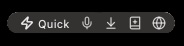
The Writrflow floating bar stays out of your way until you need it. Record instantly, switch modes, arm translation or command mode, and keep your hands on the draft.
Mode Switcher
Toggle between Prose/Fiction and Quick/General cleanup modes instantly.
Record
One click to start capturing your thoughts (or use Option/Alt + D).
Insert & History
Insert your last transcription. Right-click to see and re-insert recent history.
Add to Glossary
Found a new character name or term? Add it to your glossary mid-session.
Translation Mode
Speak in one language and get polished text in another instantly.
Command Mode
Arm it with Alt+C or the bar button. With a selection, rewrite or translate it. Without a selection, speak what you want next and Writrflow writes from cursor context.
Prefer the keyboard? Option/Alt + D records. Alt + C arms command mode. Every action also supports customizable global hotkeys.
Built for writers who value their time
Everything you need to accelerate your drafting process without sacrificing voice.
Micro-Latency Output
High-performance processing ensures text appears as fast as you think.
Dialogue Smart-Tagging
Auto-detection of spoken dialogue with proper quotation and punctuation.
Custom Glossaries
Teach Writrflow your world's unique names, places, and terminology.
Contextual Tones
Switch between creative fiction and professional general modes instantly.
Universal Compatibility
One shortcut to rule them all. Works anywhere you can type.
Privacy-First
Your voice data is yours. We use it for transcription, never for training.
Dual Processing Engines
Switch instantly between creative drafting and professional communication.
Fiction Engine
Optimized for novelists and screenwriters.
- • Smart dialogue formatting
- • Character name recognition
- • Narrative pacing preservation
- • Custom glossary support
- • Natural paragraph breaks
General Engine
For emails, notes, and professional drafts.
- • Intelligent punctuation
- • Grammar & clarity cleanup
- • Filler word removal (ums/uhs)
- • Professional tone mapping + optional live translation
- • Quick voice notes
Advanced Capabilities
Writrflow is more than speech-to-text. It is a full drafting system for multilingual, high-speed writing workflows.
Live Translation On The Fly
Dictate in one language and output polished text in another using the floating-bar translation toggle.
Speech Language Controls
Choose auto-detection or lock dictation to a fixed speech language when precision matters.
Quick Target Switching
Switch translation targets from a quick language list without leaving your writing app.
Project Profiles + Style Guides
Save project context, voice rules, and linked glossaries so every session stays consistent.
Offline Queue + Auto Retry
If your network drops, recordings queue locally and process automatically when connectivity returns.
Explicit Command Mode
Arm command mode with Alt+C or the floating bar, then speak an instruction. Rewrite selected text or generate the next paragraph from cursor context.
A native experience
Optimized for speed and reliability on your primary workstation.
macOS
Built for Apple Silicon. Option/Alt + D and native performance.
Windows
Highly responsive and compatible with Word, Scrivener, and more.
Mobile Companion
Capture thoughts on the go. Syncing soon with the desktop suite.
Superior to standard dictation
| Comparison | Standard Tools | Writrflow |
|---|---|---|
| Punctuation | Manual/Voice commands | ✓ Contextual & Automatic |
| Dialogue | Impossible to dictate | ✓ Auto-formatting quotes |
| Filler Words | Typed literally | ✓ Removed instantly |
| Names/Terms | Frequent errors | ✓ Global Glossary |
| Drafting Speed | Requires heavy editing | ✓ Submission-ready prose |
| Live Translation | Copy/paste into separate translators | ✓ Integrated toggle + target language switch |
| Network Interruptions | Sessions break or fail | ✓ Offline queue with automatic retry |
Start free and upgrade as your word count grows.
Draft Starter
- 14 days free trial
- 2,000 words per week free
- Dual-mode access
- Basic cleanup levels
- Option/Alt + D
Writrflow Pro
- Unlimited dictation
- Advanced glossaries
- Writing analytics
- Priority processing
Loved by authors
Join thousands of writers who are doubling their daily output.
"Writrflow is the first dictation tool that actually understands how dialogue works. It's magic."
"I've doubled my daily word count. Being able to 'speak' a scene is a game changer."
"The glossary feature is essential for my world-building. It never misses a character name."
Questions?
Where does Writrflow work?
Anywhere you can type. It uses Option/Alt + D to paste text directly into any application.
Can it handle fantasy or sci-fi names?
Absolutely. Use the Custom Glossary to teach it exactly how to spell your unique terms.
Is there a mobile version?
A mobile companion is in development and will sync with your desktop glossary and stats.
Do I need to say 'period' or 'comma'?
Never. Writrflow intelligently infers all punctuation from your tone and pacing.
How accurate is the dialogue detection?
It's best-in-class, trained specifically to recognize the rhythm of fiction dialogue.
Can Writrflow translate while I dictate?
Yes. Enable live translation to keep speech in one language and output polished text in your chosen target language.
What happens if my internet drops mid-session?
Writrflow keeps recordings in a local offline queue and retries processing automatically when you're back online.
Finish your draft faster.
Experience the freedom of voice-to-prose dictation today.